✈️ Flight-Hub Documentation
Overview
Flight-Hub provides APIs for flight booking, ticket management, and real-time flight metadata.
Download Postman Collection For Flight Hub: Download here
🔄 Flight-Hub API Interaction Workflow
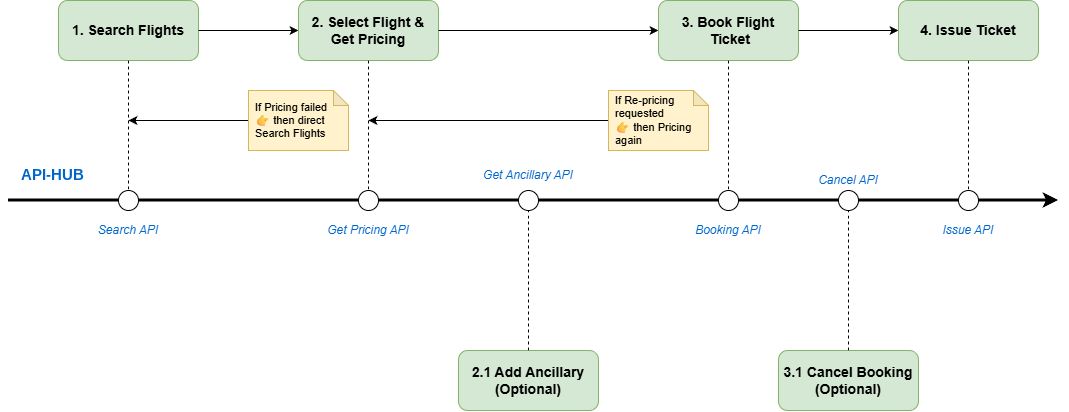
🚀 Quick Start
- Authenticate: Get your API token.
curl --location '{{host}}/connect/token' \
--header 'Content-Type: application/x-www-form-urlencoded' \
--data-urlencode 'grant_type=password' \
--data-urlencode 'client_id=' \
--data-urlencode 'password=@Password123' \
--data-urlencode 'username=account@tripdata.vn'
| Parameter | Required | Description |
|---|---|---|
grant_type |
✅ Yes | Must be password |
client_id |
✅ Yes | Client application identifier |
username |
✅ Yes | User's email/username |
password |
✅ Yes | User's password |
Authentication Details | Error Handling
API Endpoint:
- URL:
{{host}}/{path} - Method:
POST - Content-Type:
application/json
- URL:
Explore APIs:
🔑 Core Features
| Feature | Description | Documentation |
|---|---|---|
| Search Flights | Search for available flights and fares | API Document |
| Manage Bookings | View and manage flight bookings | API Document |
| Flight Metadata | Retrieve airline list and flight details | API Document |
🗂️ API Structure
graph TD
  A[Flight-Hub] --> B(Booking)
  A --> C(Manage Booking)
  A --> D(Metadata)
  B --> E[/POST /search_flight📝/]
  C --> F[/GET /bookingℹ️/]
  D --> G[/GET /b2c/*ℹ️/]

  click B "booking/search_flight_logged_in.html" "View Booking APIs"
  click C "manage-booking/get_booking_by_id.html" "View Manage Booking APIs"
  click D "metadata/overview_metadata.html" "View Metadata APIs"
  click E "booking/search_flight_logged_in.html" "View Search Flight"
  click F "manage-booking/get_booking_by_id.html" "View Get Booking"
  click G "metadata/overview_metadata.html" "View Metadata"
🌟 Use Cases
- Search and book flights with real-time availability.
- Manage and update existing flight bookings.
- Retrieve flight and airline metadata.